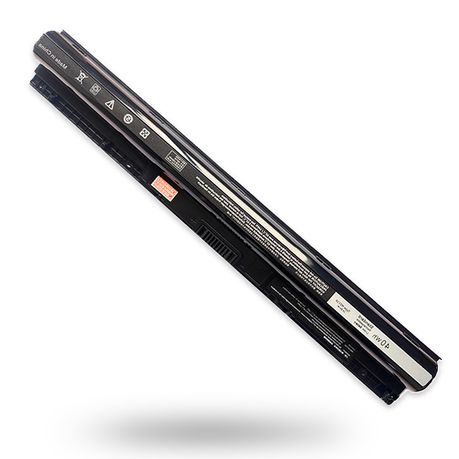
40Wh M5Y1K 14.8V Battery Compatible with Dell Laptop Replacement Inspiron
40Wh M5Y1K 14.8V Battery for Dell Inspiron 15 3000 5000 Series 5559 5558 5555 5758 3567 3551 3552 BBBQ etc
rated at Takealot · checked 4 days ago
- Average
- R 479.26
- Lowest seen
- R 396.00
- Highest seen
- R 530.00
- Last change
- -R 18.00
- First indexed
- 11 Feb 2026
- Retailer
- Takealot
Description
- FIT MODELS:
-Dell Inspiron 15 3000 Series: 3551, 3552, 3558, 3559, 3565, 3567
-Dell Inspiron 15 5000 Series: 5545, 5551, 5552, 5555, 5558, 5559, 5758
-Dell Inspiron 14 3000 Series: 3451, 3452, 3458, 3459, 3462, 3467
-Dell Inspiron 14 5000 Series: 5451, 5452, 5458, 5459
-Dell Inspiron 17 5000 Series: 5755, 5756, 5758, 5759
-Vostro 14 3458
-Vostro 3558
- SPECIFICATIONS:
-Model Name: 40Wh Standard Rechargeable Li-ion Battery Type M5Y1K
-Battery Type: Lithium-Ion
-Voltage: 14.8V
-Capacity: 40Wh / 2600mAh
-Cells: 4-cell
-Size (LWH): Approximately 10.6 x 1.5 x 0.75 inches
-Condition: 100% new
- REPLACE PART:
-M5Y1K, M5YIK, MSY1K, P51F, VN3N0, VN3NO, OVN3N0, W6D4J, WKRJ2, 6YFVW, 78V9D, 078V9D, 07G07, 007G07, K185W, KI85W, 1KFH3, GXVJ3, P51F001, HD4J0, HD4JO, 453-BBBR, 451-BBUD, 451-BBMG, 453-BBBP, 0991XP, 991XP, P28E, P47F, P51F004, P52F, P63F, P60G, P64G, P65G, YU12005-13001D
- SECURITY:
-Emanjor 14.8V 40Wh M5Y1K laptop batteries are designed with strict intelligent detection, including:
-Short circuit protection
-Over voltage protection
-Discharge protection
-Over current protection
-These features are crucial for the battery's lifecycle and safety. The batteries are manufactured with high-quality materials to ensure excellent performance and are CE, FCC, and RoHS certified.
- Must Read Before Using the Battery
Due to the special manufacturing process of batteries, prolonged storage may cause the battery to enter a dormant state and fail to function normally (this is not a quality issue). It requires extended charging to reactivate the battery. Please read the following possible situations you may encounter after purchase carefully:
Possible Battery "Dormancy" (Can Try Reactivation)
- Displays 100% charge but shuts down immediately when the charger is disconnected
- Shows a notification of "Battery not charging / Battery error, please replace"
- Solution Suggestion: Keep the charger connected and let it charge for 2-4 hours, then press and hold the power button for 15-30 seconds to reset before attempting to power on.No response when plugged in, unable to power on
Incompatibility Issue (Return Recommended)
- Only 10-20 minutes of usage after a full charge
- Battery health drops sharply to below 70% after a small number of charge cycles
- Note: This type of issue is generally related to incompatibility with the laptop model. Even if some laptop models appear to match, they may not work due to inconsistent voltage used by the original factory.Fails to charge normally or experiences frequent power drops
What's in the box
1 x M5Y1K 14.8V Battery
Similar products

Takealot
40WH M5Y1K 14.8V Battery compatible with Dell Inspiron 14 15 17 5000 3000 Series
4.9(33)
Prime
Replacement Laptop Battery Compatible with DELL 6MT4T E5470/E5570 7.6V

Takealot
Rechargeable Laptop Battery Compatible with F286h Inspiron 1410

Prime
Replacement Laptop Battery Compatible with DELL CQ42 CQ56 CQ62 CQ72 10.8V
 −12%
−12%Takealot
Replacement Laptop Battery Compatible With Dell Latitude E5450 7.4V 51Wh
 −10%
−10%Takealot
Replacement Battery Compatible with Dell Inspiron 3451 3458 3551 3558 5551 P/N: M5Y1K
4.4(9)
Prime
Replacement Laptop Battery Compatible with Apple A1953/A1990 11.4V

Takealot
Replacement Laptop Battery Compatible with LENOVO L16L2PB2/L16L2PB1 7.6V

Prime
Replacement Laptop Battery Compatible with HP PG03XL/Q229 11.55V 4550mAh

Takealot
MU06 Compatible with HP Laptop Battery G62 G7 G4 593553-001 Pavilion Series
4.5(10)
Prime
Replacement Laptop Battery Compatible with HP RR03XL 11.4V 4210mAh 48Wh

Prime