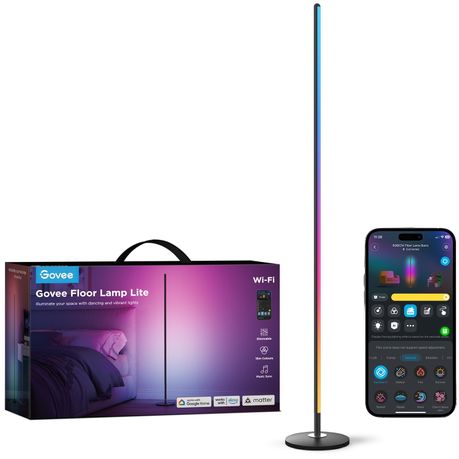
Govee Floor Lamp Lite -RGBICW Smart LED Floor Lamp with Matter & Music Sync
Govee Floor Lamp Lite -RGBICW Smart LED Floor Lamp with Matter & Music Sync
Takealot · checked 10 days ago
2 offers · 2 retailers
Best price PriceFind tracks
No other tracked retailer beats this price. Compare every offer
- Average
- R 2 499.00
- Lowest seen
- R 2 499.00
- Highest seen
- R 2 499.00
- Last change
- R 0.00
- First indexed
- 20 Sep 2026
- Retailer
- Takealot
Description
The Govee Floor Lamp Lite combines modern design with powerful smart lighting technology to transform your living space.
Its slim, minimalist build seamlessly fits into contemporary décor, while RGBICW technology unlocks 16+ million colors and a full spectrum of whites to suit any mood or occasion.
With Matter support for seamless smart home integration, built-in music sync, and voice control via Alexa or Google Assistant, this floor lamp offers both elegance and intelligence.
FEATURES & BENEFITS:
Elegant Modern Design:
A slim, minimalist profile that adds sophistication and style to any room.
Vibrant RGBICW Lighting:
Enjoy 16 million customizable colors with tunable warm-to-cool white lighting for every mood.
Immersive Music Sync:
Lights respond dynamically to the beat of your favorite songs for parties, gaming, or relaxation.
Matter Smart Home Integration:
Matter is a cutting-edge smart home connectivity standard that ensures seamless interaction between IoT devices across different brands.
Designed by industry leaders like Apple, Google, and Amazon, Matter enables devices to communicate effortlessly using secure and reliable technologies like Wi-Fi and Thread.
Its key features include easy setup, enhanced security, and full interoperability, meaning no more compatibility issues across your smart home devices. With Matter, you can control everything from lights to thermostats and security systems in one unified ecosystem.
Upgrade your smart home with Matter-compatible devices for a smoother, more reliable experience.
Voice & App Control:
Hands-free control with Alexa and Google Assistant, plus full customization via the Govee Home App.
Custom Scenes & Effects:
Personalize your lighting with pre-set modes or design your own immersive effects.
SPECIFICATIONS:
Product Name: Govee Floor Lamp Lite
Model Number: H8076
Lighting Technology: RGBICW (RGB + Tunable White)
Colors: 16+ million
White Temperature Range: Warm white to cool white
Connectivity: Wi-Fi, Bluetooth
Smart Home Support: Matter, Alexa, Google Assistant
Control Methods: Govee Home App, Voice Control
Features: Music Sync, Scene Modes, Custom Effects
Design: Slim & minimalist floor-standing lamp
ABOUT GOVEE:
Govee is a global leading smart home brand with 12M+ App registered users since 2017, pursuing personalised and fun life experiences through continuous innovations, especially in ambient lighting, home appliance products, and smart IoT systems.
We design it. We produce it. We make life smarter.
INSTRUCTIONS:
Safety Instructions
IMPORTANT SAFETY INSTRUCTIONS
When using products, basic precautions should always be practiced including the following:
- Use the product with the provided power adapter only.
- The product is not waterproof. Do not expose it to areas susceptible to water splashes or water drops.
- The internal light sources cannot be replaced. If it breaks, the product should be replaced. Do not allow children to install the floor lamp alone. Do not disassemble or modify the device and its accessories.
- Avoid installing the device near potentially dangerous sources or heat sources (e.g. candles, liquid-filled objects.)
- The working temperature should be between 14 F to 104 F
(-10 C to 40 C). - Store the product in places where the temperature is within
- 4 F to 140 F (-20 C to 60 C) if you do not plan to use it for a long time.
- Do not install the product with a dimming driver.
- This product is equipped with a microphone, which is only used to capture the rhythm of the sound.
- CAUTION-The product is not a toy. Children and the disabled should use it under adult supervision.
Controls:
Buttons:
On/Off Button - Press to power the lamp on/off.
Scene Button - Tap to select a scene or color temperature. Tap and hold to switch between Scenes and Color Temperature.
Installing Your Device
Step 1
Connect the connectors before plugging the fixture into a power source to confirm whether it lights up. If an abnormality is found, please contact customer service in time.
Step 2
If the lamp works well, disconnect the power adapter and install based on the pictures.
Tips:
1. Adjust the lamp head angles to light up your ceiling. The lamp head is adjustable at 60 in the vertical direction.
2. Three slots are provided to organize the cords in the lamp base, please fix the cords in proper locations as needed.
Pairing Your Light with Govee
Home App
A Wi-Fi router supporting the 2.4GHz and 802.11b/g/n bands is required. 5GHz is not supported.
Download on the
- Download Govee Home App from the App Store (iOS) or Google Play (Android). Log in with your account. New users need to create an account.
- Turn on the Bluetooth on your smartphone.
- Open the app, tap the "+" icon in the top right corner and search for "H6OBO"
- Tap the device icon and follow the on-screen instructions to complete pairing.
Matter Guide
1. How to use Matter
Step 1
Find the Matter QR code or device number on the product or on the "Device Settings" page in Govee Home App.
Step 2
Turn on the Bluetooth on your smartphone and keep it on.
Step 3
Download and open the app that supports Matter such as Amazon Alexa/Google Home/Apple HomeKit, etc.
Step 4
Use the device number or QR code on the device in the app to complete the network connection with Matter for the device.
2. Important
You will need to complete the network connection of apps that support Matter (e.g. Amazon Alexa/Google Home/Apple HomeKit etc.) within 15 minutes after the product is powered on when using Matter for the first time.
An IPv6 network is required.
Changing the network may cause Matter to malfunction.
If the product cannot connect to the app, Long press the power button on the lamp pole and press the Scene Button 4 times consecutively to restore factory settings. After that, try connecting again later.
If you need to change the network when using Matter, close Govee Home App and power off the device. Then, power back on and complete the network connection of apps that support Matter (e.g. Amazon Alexa/Google Home/Apple HomeKit etc.)
within 15 minutes.
Controlling the Lamp with Your Voice
- Open the app, then tap the device icon to enter the control page.
- Tap the settings icon in the top right corner.
- Select "User Guide" and follow the on-screen instructions to control the device using your voice.
Troubleshooting
1. Cannot connect to Govee Home App.
- Check if the lamp has been powered on.
- Check if your smartphone's Bluetooth has been turned on or try connecting the lamp to another smartphone.
- Ensure that your smartphone is near the lamp when connecting for the first time.
- If the problem persists, go to the "Device" page to delete the device and follow the previous instructions to reconnect.
2. Cannot connect to Wi-Fi.
- Check if the lamp has been powered on.
- Do not skip connecting to Wi-Fi during the pairing process.
- Ensure that your Wi-Fi router is 2.4GHz capable (5GHz is not supported).
- Ensure that you entered the correct Wi-Fi password during the Wi-Fi connection process.
- Shorten the distance between the lamp and the Wi-Fi router to less than 50ft, then try reconnecting.
- Use another smartphone to pair with the lamp to check if your Wi-Fi network is working.
3. Cannot pair or connect with Alexa or Google Assistant.
- Check if the lamp has been powered on.
- Do not skip connecting to Wi-Fi during the pairing process.
- Ensure that your Wi-Fi router is 2.4GHz capable. 5GHz is not supported.
- Ensure that you entered the correct Wi-Fi password during the Wi-Fi connection process.
- Shorten the distance between the lamp and the Wi-Fi router to less than 50ft, then try reconnecting.
- Use another smartphone to pair with the lamp to check if your Wi-Fi network is working.
4. The lamp does not display the selected color fully or some
LED beads do not light up.
a. Please contact Customer Support for a rapid product replacement.
5. Reset to factory settings
a. Long press the power button on the lamp pole and press the Scene Button 4 times consecutively to restore factory settings.
Disassembly Tip:
The product is divided into two parts: (1) a light source and (2) an adapter. By detaching the output terminal of the adapter, you can easily remove the light source or the adapter.
What's in the box
1 × Govee Floor Lamp Lite
1 × EU Power Adapter
1 × User Manual
1 × Quick Start Card

