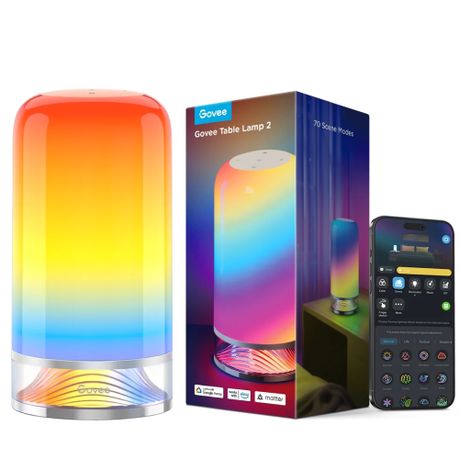
Govee RGBICWW Smart Table Lamp - Ambient Light With Voice Control
16m Colours, 60+ Scenes, 4 Control Modes, Dimmable Brightness, Timer For Sleep & Wake Routines
rated at Takealot · checked 9 days ago
2 offers · 2 retailers
Best price PriceFind tracks
No other tracked retailer beats this price. Compare every offer
- Average
- R 1 388.25
- Lowest seen
- R 1 199.00
- Highest seen
- R 1 399.00
- Last change
- R 160.00
- First indexed
- 20 Aug 2026
- Retailer
- Takealot
Description
With 16 million RGB colours and over 60 lighting scenes, enjoy dynamic illumination and the perfect ambience-all in one sleek, decorative design.
This table lamp emits warm and vibrant colors that can help with peaceful sleep and awaking gently, in addition, it includes smart voice controls for effortless hands-free use.
MAIN FEATURES:
RGBIC & 16 Million Colours:
Access a full spectrum of 16 million RGB colours and over 60 preset scenes for vibrant, dynamic lighting, all controllable through multiple methods.
4 Control Options:
Enjoy flexibility with touch control, remote control, app control, and voice control via the built-in smart speaker.
Dimmable Lighting:
Adjust brightness from 1% to 100%. Tunable white light from 2700K (warm white) to 6500K (cool white) suits various daily activities.
Customisable DIY Mode:
Design your own lighting effects with a wide range of colour combinations to match any mood or decor.
Voice & App Control:
Compatible with Alexa, Google Assistant, and Matter. Control your bedside lamp hands-free with simple voice commands.
Timer Function:
Set schedules to help you fall asleep and wake up naturally with gentle lighting transitions.
SPECIFICATIONS:
- Model: H6022
- Light Colors: RGBICWW
- Brightness (Lumens): 500lm
- Color Temperature: 2700K-6500K
- Product Dimension/Length: 104×104×220mm
- String Light Color: White
- Control Methods: App, Function Buttons, Voice Control
- Matter Support: Yes
- App Connectivity: 2.4GHz Wi-Fi + Bluetooth
- Voice Control: Alexa, Google Assistant
- Power Supply: AC 200-240V
- Input Voltage: 12VDC 2A
- Wattage: 24W
- Temperature Range: -10~40 C
- Special Features: RGBIC & 16 Million Colors, 3 Control Options, Timer Function
INSTRUCTIONS:
Safety Instructions
Read and follow all the safety instructions:
The lamp is not waterproof. Avoid exposing it to splashing or dripping water.
The operating temperature should be within -10 C to 40 C (14 F to 104 F).
The lamp's internal light source cannot be replaced individually. If it breaks, the entire lamp must be replaced.
The lamp and the power adapter are meant to be used together. Do not attempt to use either of them with other devices or adapters.
Do not use the lamp with a dimming driver.
Avoid using the lamp near heat sources.
Avoid using the lamp near potentially dangerous sources (e.g., candles, liquid-filled objects, etc.).
CAUTION - The product is not a toy. Children and the disabled should use it under adult supervision.
Operation Buttons:
Color Mode
Brightness Up
Brightness Down
Power On/Off
Scene Mode
The Bedtime Switch feature allows the entire control touchpad to function as one big on/off button. This makes it easier when in the dark to tap anywhere on the top of the lamp and turn on light. This feature can be activated in the lamp's app settings.
On/Off Button
Press to power the lamp on or off.
Brightness
Press to increase the brightness.Brightness
Press to decrease the brightness
Scene Mode
Press to switch scene modes. Supports preset scenes in the app.
Color Mode
Press to change light colors.
Restore factory settings
While long-pressing the On/Off button, tap the Brightness Down button four times.
Installing Your Device
1. Insert the power adapter cable into the lamp's DC port.
2. Plug the power adapter into a power outlet.
Pairing Your Device with Govee Home
App
What you need:
A Wi-Fi router supporting the 2.4GHz and 802.11 b/g/n bands. 5GHz is not supported.
1. Download Govee Home App from the App Store (iOS devices) or
Google Play (Android devices).
2. Open the app, tap the "+" icon in the top right corner and search
"H6022"
3. Tap the device icon and follow the on-screen instructions to complete pairing.
Troubleshooting
1. Cannot connect to Govee Home App.
Check if the table lamp is powered on.
Check if Bluetooth on the smartphone is enabled, or try connecting to another smartphone.
When connecting for the first time, ensure the smartphone is near the table lamp.
If the connection error still exists, please delete the connected device from "Device" on the app. Reconnect to the Govee Home App by following the instructions provided previously.
Wi-Fi disconnected or failed to connect?
Check if the table lamp is powered on.
Do not skip the Wi-Fi connection steps during the pairing process.
Ensure your Wi-Fi router is 2.4GHz. 5GHz is not supported.
Ensure you entered the correct Wi-Fi password during the Wi-Fi setup process.
Try using another smartphone to pair with the table lamp to ensure your network is working properly.
Shorten the distance between the device and the Wi-Fi router to less than 50ft, and then reconnect.Cannot connect to Alexa or Google Assistant.
Ensure the Wi-Fi connection is stable and working properly.
Go to "User Guide" on the "Settings" page to pair the device again.Can multiple app users control the same app users?
Each lamp can only be controlled by one account.
If multiple users want to manage the same lamp, ensure they all use the same account.
Disassembly Tip
To more easily move or store this light source, the light source can be disconnected from the adapter. Additionally, the adapter and power plug cable can be disconnected from each other.
What's in the box
1 x Govee Table Lamp
1 x EU Power Adapter
1 x User Manual
1 x Service Card
Similar products
 −12%
−12%Govee
Govee RGBICWW Floor Lamp 2 - (1.5m High) Smart, Matter Compatible, LED Base
5.0(2) −11%
−11%Govee
Govee Gaming Light Bars Pro - RGBICWW WiFi + Bluetooth Smart LED Light Bars
4.0(1)
Govee
Govee RGBICWW Smart Garden Lights -2 Pack - Outdoor LED Spotlights

Govee
Govee 15-Inch RGBICWW Smart Ceiling Light Pro
 −22%
−22%Govee
Govee Floor Lamp Pro RGBICWW Smart Corner Floor Lamp With Speaker - 1.7m
5.0(4) −19%
−19%Govee