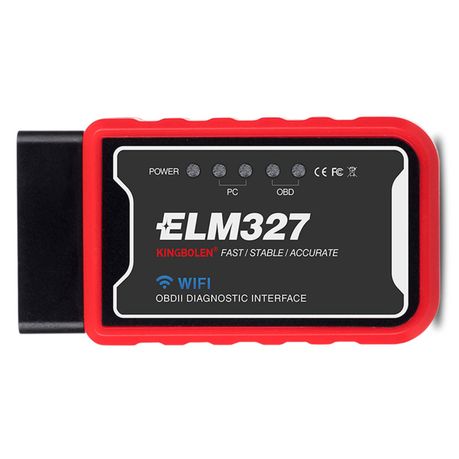
Kingbolen WI-FI ELM 327 OBD2 Scanner
Kingbolen
rated at Takealot · checked Today
25 offers · 1 retailers
Listed under the same model number
No barcode ties these listings together, so no saving is claimed. See the listings
Matched by model number; no shared barcode
- Average
- R 399.00
- Lowest seen
- R 395.00
- Highest seen
- R 450.00
- Last change
- R 26.00
- First indexed
- 09 Feb 2024
- Retailer
- Takealot
- View
R 99.00
- View
R 135.00
+R 36.00
Takealot
OBD2 Scanner Adapter Wireless Diagnostic Code Reader Car Fault Detector3.5(22) Checked Yesterday
ViewR 144.00
+R 45.00
Takealot
Obd Connection Cable/On-Board Diagnostic Cable Compatible with Bmw Vehicles1.0(1) Checked 7 days ago
ViewR 150.00
+R 51.00
Takealot
OBD2 Extension Cable 16 Pin Male to Female 60cm Diagnostic Adapter for CarChecked 7 days ago
ViewR 155.00
+R 56.00
- View
R 168.00
+R 69.00
- View
R 179.00
+R 80.00
- View
R 182.00
+R 83.00
- View
R 182.00
+R 83.00
- View
R 183.00
+R 84.00
- View
R 190.00
+R 91.00
- View
R 195.00
+R 96.00
- View
R 198.00
+R 99.00
- View
R 199.00
+R 100.00
- View
R 201.00
+R 102.00
- View
R 212.00
+R 113.00
- View
R 216.00
+R 117.00
- View
R 220.00
+R 121.00
- View
R 221.00
+R 122.00
- View
R 222.00
+R 123.00
- View
R 222.00
+R 123.00
- View
R 224.00
+R 125.00
- View
R 226.00
+R 127.00
- View
R 227.00
+R 128.00
Takealot This listing
Kingbolen WI-FI ELM 327 OBD2 Scanner
4.3(17) Checked Today
ViewR 425.00
+R 326.00
Each price is from PriceFind's last check of that retailer. Follow the link for the live price.
Description
WI-FI ELM327 interface is able to detect and interpret obd2 / eobd protocols automatically. It also provides support for high speed communications and a low power sleep mode. It use AT commands to communicate with a host device (PC, notebook, for iOS). There are plenty of software packages available, which are fully compatible with this tool. Some of them have pretty useful features, such as engine running parameters monitoring, DTC reading and clearing, MPG meter, etc. You can even write your own software on a specified hardware platform if you wish, because the AT commands are fully documented and very well explained. This tool is only 2.7 x 1.25x 0.9 inches, and it comes with a 6 ft OBDII cable for easy installation. It also includes a power switch built-in to prevent the need for having to constantly disconnect your unit from the OBDII port. It is compatible with 1996 and later vehicles which are obd2 or eobd compliant. Connecting to your iPhone / iPod touch is made by WIFI connection in adHoc mode.
Features: Firmware Version V1.5 (Supports more protocols SAE J1850 than V2.1).
NOTE! Some known cars that the scanners are not compatible with:
VW Polos
Fortuner
Hilux
Range rover
Bakkies and Suv s etc.
For Indian TATA, MARUTI, and MAHINDRA, Malaysia PRONTON, PERODUA, Iran SAIPA, IKCO, ELM 327 cannot support.
For Russian car models, like Lada, only latest models that support OBD2 protocols can work with ELM327
Not suitable for bikes
Due to design of the OBD area this device will not fit on VW vehicles without an OBD Extender cable
With chip: PIC18F25K80, supports all elm327 functions, in program ELM327 identifier, it shows full functions.
It understand commands such as ATPPS and other.
The frequency of the crystal oscillator is 4mHz.
Main Functions:
With proper software installed in the host device, you may have following parameters read out from your vehicle:
Vehicle Speed
RPM
Fuel Consumption
Engine Coolant Temp
Fuel Pressure
Calculated Engine Load
Throttle Position
Intake Manifold Pressure
Air Intake Temp
Timing Advance
Mass Air Flow
Fuel Level
Barometric Pressure
EVAP System Vapor Pressure
Fuel Trim
Note: Your vehicle may not support all above parameters. How many parameters you can get depends on the vehicle manufacturer's implementation.
Note: For Indian TATA, MARUTI, and MAHINDRA, Malaysia PRONTON, PERODUA, Iran SAIPA, IKCO, ELM 327 cannot support.
For Russian car models, like Lada, only latest models that support OBD2 protocols can work with ELM327
NOT SUITABLE FOR BIKES
Support Protocols:
1. SAE J1850 PWM (41.6Kbaud)
2. SAE J1850 VPW (10.4Kbaud)
3. ISO9141-2 (5 baud init,10.4Kbaud)
4. ISO14230-4 KWP (5 baud init,10.4 Kbaud)
5. ISO14230-4 KWP (fast init,10.4 Kbaud)
6. ISO15765-4 CAN (11bit ID,500 Kbaud)
7. ISO15765-4 CAN (29bit ID,500 Kbaud)
8. ISO15765-4 CAN (11bit ID,250 Kbaud)
9. ISO15765-4 CAN (29bit ID,250 Kbaud)
A. SAE J1939 CAN (29bit ID,250Kbaud)
B. USER1 CAN (11bit ID,125Kbaud)
C. USER2 CAN (11bit ID,50xkbaud)
xdefault settings (user adjustable)
Recommend APP:
iOS APP: Car Scanner for iOS, OBD Auto Doctor for iOS, OBD Car Doctor for iOS, EOBD Facile for iOS, DashCommand for iOS (Paid APP).
Android APP: Torque Pro for Android; Mini OBD2 for Android, WIFI OBDII Connection IOS for OBD Car Doctor, OBD Car Doctor for Android; DashCommand (OBD ELM App) for Android.
Windows APP: FT232R USB UART, PL2303 USB OBDII Driver, PCMSCAN for Windows, ScanMasteer-ELM for Windows, RAR file (ELM327 software.rar).
How To Connect With Your Phone?
1) Plug the OBD reader into the vehicle and start the vehicle fully
2) Ensure that the red light is illuminated on the OBD reader
3) Connect to the ELM in the Wi-Fi menu of your chosen device
4) Open Torque and complete the internal Torque setup process once again as described in the instructions.
Device dimensions are: L 8cm W 6cm H 2.5cm
What's in the box
1 x ELM327 device