
Konnwei KW590 OBDII Diagnostic Scanner Engine Fault Code Reader
Takealot · checked 4 days ago
7 offers · 1 retailers
Listed under the same model number
No barcode ties these listings together, so no saving is claimed. See the listings
Matched by model number; no shared barcode
- Average
- R 599.00
- Lowest seen
- R 599.00
- Highest seen
- R 599.00
- Last change
- R 0.00
- First indexed
- 27 Sep 2026
- Retailer
- Takealot
- View
R 430.00
- View
R 549.00
+R 119.00
- View
R 570.00
+R 140.00
- View
R 589.00
+R 159.00
- View
R 599.00
+R 169.00
- View
R 599.00
+R 169.00
Takealot This listing
Konnwei KW590 OBDII Diagnostic Scanner Engine Fault Code Reader
Checked 4 days ago
ViewR 599.00
+R 169.00
Each price is from PriceFind's last check of that retailer. Follow the link for the live price.
Description
Feature:
- Works on most 1996 US-Based, 2000 EU-Based and Asian cars. Supports all OBDII protocols.
- Reads and Clears Trouble Codes, Turns off CHECK ENGINE LIGHT, Reset Monitors.
- Freeze Frame Displays the Certain Vehicle Status When Emission-related Fault Occurs.
- I/M Readiness is Used to Check the Operations of the Emission System.
- Displays Live O2 Sensor Test Data and Very Fast Reads Live Time Data.
- On-Board Monitor Displays Test Result for Emission-related.
- Component Test Allows Initiating a Leak Test for the Vehicle’s EVAP System.
- Displays the Vehicle’ Identification Number, Calibration ID and Calibration Verification Number.
- Record Data Function Allows Recording Vehicle Modules’ Parameter Identification (PID) Data to Help Diagnose Intermittent Problem.
Specification:
- Brand Konnwei
- Konnwei 12V
- Color Black
- Backlit display 320 x 240 pixel
- USB cable length 80cm
- Working temperature - 60 Deg.C to 60 Deg.C
- System language English, French, German, Dutch, Spanish
- Computer system supporting WIN7, WIN8, WIN10 on 32 bit Windows operating system
- Supporting protocol ISO 9141, KWP2000, SAE J1850, CAN, J1850 VPW, J1850 PWM
- Data measurements OBD II repair information
Tips For Doing Update And Printing:
KW590 OBD Codes Reader is an Upgraded Version Allows You Lifetime Free Updating and Printing with the Following Tips:
- Keep Pressing Any button of the Scanner, then Connect It to Your PC (Windows XP-10) With the Included USB Cable.
- Search Online the Website: www. itoscanner.com Which Will Be Displayed on the Scanner Screen When Connected.
- Download the Software Online and Install it on PC for Updating and Printing. Easy to Operate. CD Not Required.
What's in the box
1 x OBDII/EOBD Scanner
1 x USB Cable
1 x Instruction Manual
Similar products

Konnwei
KW870 universal Car OBDII Diagnostic Scanner and Battery Tester
1.0(1)
Takealot
KONNWEI KW680 OBD2 Code Reader Car Diagnostic Scanner Tool Full OBDII
4.1(35)Takealot
KONNWEI KW680 OBD2 Code Reader Car Diagnostic Scanner Tool Full OBDII
4.0(6)
Konnwei
Konnwei OBDII Full System VW AUDI Car Diagnostic Scanner KW450
5.0(6)
Phunk
Konnwei KW680 Diagnostic Scan Tool (OBDII Engine Codes & Live Data)
3.8(37)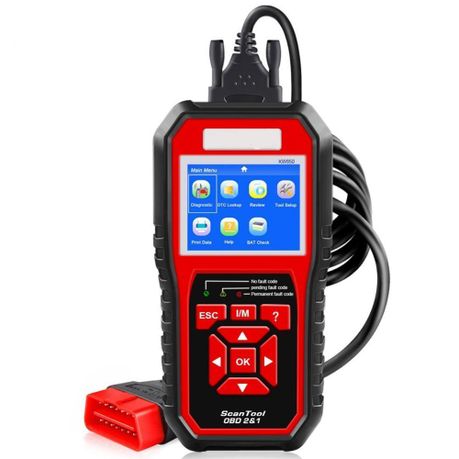
Konnwei
Konnwei KW850 OBDII&CAN Diagnostic Scan Tool | Fault Codes Read/Clear
4.0(154)
Takealot