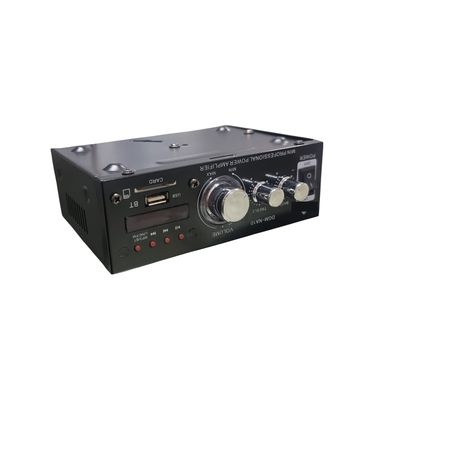
Mini Digital Audio Power Amplifier DGM-NA10 Compatible With Bluetooth
rated at Takealot · checked 2 days ago
- Average
- R 598.35
- Lowest seen
- R 499.00
- Highest seen
- R 787.00
- Last change
- -R 3.00
- First indexed
- 12 Jan 2026
- Retailer
- Takealot
Description
DGM-NA16
HOUSEHOLD AMPLIF
IER & CARAMPLIFIER
Amplifier With AC/DC
Amplifier with BT,USB/SD/FM
Radio, etc, inputVoltage can be both
AC 230V and DC 12V
:2x40Wpower output
-Radio FM (87.5-108.5)
FM/USB/SD/M P3/DVD
AC 230V/DC 12 V input
-BTL Circuit
-Microphone
Support BT Function
[10:19 pm, 08/07/2025] Smile happy: FRONT PANEL FUNCTIONS
1.POWER-To switch the main power of the product to "ON" or "OFF"
Set all the volume controls to minimum before switching to power of the product to "ON"
2.MUSIC BASS-To adjust the low frequency sound level of the selected source audio.
3.MUSIC TREBLE -To adjust the high frequency sound level of the selected source audio.
4. MUSIC VOLUME- To adjust the sound output level of the selected source audio.
5.PLAYIPAUSE-To pause or to resume USB/SD Mp3 audio playback or bluetooth audio streaming.
SCAN-To perform auto-program of FM radio stations to its preset channel number.
6.NEXT-To select the next track number during USB/SD operation or bluetooth audio streaming.
CH+To select the next channel number of programmed FM radio preset station.
7.OLED Display-To display information during operation.
8. USB input -To insert your USB flash drive with Mp3 audio files into its input port.
9. SD input- To insert your SD flash drive with Mp3 audio files into its input port.
NTFS formatted USB and SD card flash drives are not compatible on this product.
10.PREVIOUS-To select the previous track number during USB/SD operation or bluetooth audio streaming.
CH-To select the previous channel number of programmed FM radio preset station.
11.Mode-To select the desired audio input source.
12.MIC input- To connect the microphones into the microphone input jacks (6.35mm) of the product.
VOLOME-To adjust the sound output level of the microphones connected to the micophone input jacks.
[10:21 pm, 08/07/2025] Smile happy: Back Penal Input/Output
1. FM TELESCOPIC ANTENNA - Extend the telescopic antenna to its full length AND adjust the position for best FM
radio signal recept?on.
2. AUX INPUT Jacks - To connect the left and right audio output channels of your external audio/video player
gadget with analog audio output.
3. LINE OUTPUT Jacks To connect the product to your active subwoofer system or additional audio power amplifier
through analog audio connection.
4. RIGHT CHANNEL SPEAKER OUTPUT Terminals To connect the RIGHT CHANNEL speaker system.
Connect the positive lead of the speaker wire (RED) to the positive terminal (+) and the negative lead of the speale
wire (BLACK) to the negative () terminal.
5. LEFT CHANNEL SPEAKER OUTPUT Terminals To connect the LEFT CHANNEL speaker system.
Connect the positive lead of the speaker wire (RED) to the positive terminal (+) and the negative lead of the spe
wire (BLACK) to the negative (-) terminal.
6. DC POWER INPUT Terminals- To connect the product to an external 12V car battery when AC power is not avai
7. AC POWER Cord - To connect the product to the main power source outiet.
Make sure the power switch is set to "OFF" position before connecting the AC plug to the power outlet.
What's in the box
1 X Mini Digital Audio Power Amplifier DGM-NA10 Compatible With Bluetooth
Similar products
 −13%
−13%Kemei
St-838 2.1ch Audio Power Amplifier, Rms 20wx2+40w Class D Stereo

Takealot
Mini Bluetooth 5.0 Power Amplifier, Stereo Hi-Fi Digital Amp 2.0 CH 50W×2
4.3(7)
Takealot
3.5mm Mini TOSLINK to TOSLINK Optical Audio Cable SPDIF Digital Fibre 2M

FOSI Audio
Fosi Audio K5 Pro Gaming DAC Headphone Amplifier Mini Hi-Fi
4.3(10) −29%
−29%Takealot
Fosi Audio Q6 Mini Desktop DAC, USB C Digital to Analog Audio Converter
Takealot
Premium Mini TOSLINK to TOSLINK Optical Audio Cable SPDIF Digital Cable 2M

Takealot
B6 6-Channel Mixer, USB/BT, Soundcard, +48V Phantom Power

Takealot
T6 6-Channel Mixer, 16 DSP, +48V, BT/MP3, Recording

Takealot