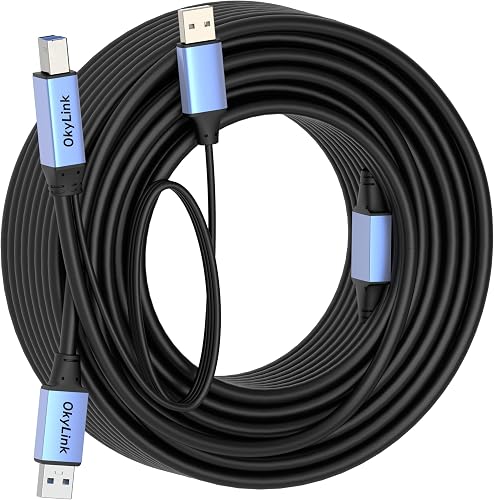
OkyLink Active USB 3.0 Repeater Cable, A to B, Male to Male 5Gbps, 65ft
R 4 015.00
Amazon · checked 6 days ago
2 offers · 1 retailers
Listed under the same model number
No barcode ties these listings together, so no saving is claimed. See the listings
Matched by model number; no shared barcode
- Average
- R 4 015.00
- Lowest seen
- R 4 015.00
- Highest seen
- R 4 015.00
- Last change
- R 0.00
- First indexed
- 20 Nov 2026
- Retailer
- Amazon
Amazon Cheapest
OkyLink USB 3.2 USB-C to Micro-B Male-Male Cable 10Gbps 6.5ft4.8(9) Checked Yesterday
ViewR 1 109.00
Amazon This listing
OkyLink Active USB 3.0 Repeater Cable, A to B, Male to Male 5Gbps, 65ft
Checked 6 days ago
ViewR 4 015.00
+R 2 906.00
Each price is from PriceFind's last check of that retailer. Follow the link for the live price.
Description
🔍 【Choose The Perfect Length】 USB 3.0 / USB 3.2 Gen1 (5Gbps): 3–10ft(1–3M) passive cables support 5Gbps data transfer and 60W charging. 15–160ft(5–50M) active cables with built-in signal booster: optimized for high-speed data transmission, supporting up to 5W power output, comes with 2.5ft(0.8M) aux power cable.
⚡ 【SuperSpeed Data Transfer】 USB 3.2 Gen1 supports stable 5Gbps data transfer for printers, scanners and external storage devices. Supports Windows, macOS, Linux and ChromeOS.
🔌 【Optional Aux Power for Stable Connections (15ft/5M+)】 Long active cables come with an integrated 2.5ft(0.8M) aux power cable at the device end. Plug it into a USB power adapter or hub to maintain stable high-speed transmission over long distances.
🛡️ 【Durable Aluminum-Reinforced Build】 Premium aluminum alloy connectors provide strong EMI shielding, efficient heat dissipation and high durability, ideal for frequent plugging in home, office and industrial environments.
💡 【Wide Compatibility & Connection Guidance & Note】 Works with HP, Canon, Epson, Brother printers, scanners and external HDD/SSD enclosures. ⚠️ IMPORTANT: This cable uses USB 3.0/3.2 Gen1 USB-B connector, NOT compatible with USB-B 2.0 / 1.1 ports. - Short cables: support bidirectional connection. - Long active cables: USB-A to host, USB-B to device. - Under special circumstances for cables with aux power, we recommend connecting the aux power first, then plugging in the Host End.
