
Printer All-in-One Ink Tank L3211 + Laminator & Photo Paper | Epson
EcoTank L3211 Print, Copy & Scan with Hot & Cold A4 Laminator, 50 Matte Sheets & USB Cable
Takealot · checked 12 days ago
- Average
- R 3 299.00
- Lowest seen
- R 3 299.00
- Highest seen
- R 3 299.00
- Last change
- R 0.00
- First indexed
- 15 Sep 2026
- Retailer
- Takealot
Description
Epson EcoTank L3211 All-in-One Printer + ZATECH Fusion A4 Laminator + 50 Sheets Matte Photo Paper + USB Cable - Print It, Protect
It
Print a certificate, a menu, a photo or a name badge, then seal it so it lasts. This bundle pairs the Epson EcoTank L3211 all-in-one printer with a ZATECH Fusion A4 laminator, 50 sheets of professional matte photo paper, and the USB cable that connects the printer to your computer. One delivery, the full workflow from blank page to finished, protected document.
Say Goodbye to Expensive Cartridges
Ordinary printers are cheap to buy and painful to keep running. Cartridges empty fast and cost a fortune to replace. The EcoTank L3211 works the other way around. Ultra-high-capacity ink tanks refill from bottles instead, saving you up to 90 percent on printing costs. The set of bottles included here delivers up to 8,100 pages in black and 6,500 pages in colour, which for most homes is years of printing.
Print, Copy and Scan in One Machine
- Print - Clear text and colour for certificates, invoices, menus, forms and school projects, plus borderless photo printing up to 10 x 15cm.
- Copy - Make copies directly on the machine, no computer needed.
- Scan - Scan documents and photos straight to your computer to save, share or file them.
Print speeds reach up to 10 pages per minute, and the 100-sheet rear paper tray means fewer stops to reload.
Heat-Free Technology Built to Last
Epson's Micro Piezo Heat-Free Technology fires ink without warming up first, so there is no waiting for the printer to reach temperature and less energy used on every job. The printhead is durable, long-lasting and comes pre-installed, so setup is quick and there is nothing to fit yourself.
Mess-Free Refills
Refilling used to mean stained hands and guesswork. Epson's key-lock bottles are shaped so only the correct colour fits its matching tank, making it impossible to pour cyan into the magenta side by mistake. The tanks are easy to read at a glance, so you always know how much ink is left. No cartridge chips, no shaking, no mess.
ZATECH Fusion A4 Laminator
- Hot and Cold Lamination - Handles 80, 100 and 125 micron pouches in both hot and cold modes, so you can seal ordinary documents or heat-sensitive items like older photos and thermal receipts.
- Sizes from A6 to A4 - Laminate business cards, ID cards, recipe cards, certificates, menus and full A4 documents on one machine.
- Ready in 3 to 6 Minutes - A short warm-up and you are laminating. Pulse width adjusted heating keeps the temperature steady through a run, so the last pouch comes out as cleanly as the first.
- Release Button for Misfeeds - If a pouch goes in crooked, press release and pull it straight back out. No dismantling, no ruined document, no jammed machine.
- Protects What Matters - Certificates, colour printouts, photos, menus, price lists, membership cards and signage all last far longer sealed than they do bare.
Plus 50 Sheets of Matte Photo Paper
The included ZATECH A4 Professional Matte Inkjet Photo Paper is coated on both sides with a bright white finish and a 92+ brightness rating. Matte is the practical choice for anything you will handle, frame under glass, or laminate, because it does not show fingerprints and does not fight with glare the way a glossy surface does. It dries quickly, so prints can be handled straight away without smudging.
Plus the USB Cable to Connect It
The L3211 connects to your computer by USB, and this bundle includes the cable. The 1.5 metre USB 2.0 Type-A to Type-B lead is the standard printer connection, long enough to reach a desktop tower or a laptop set to one side. It is the one part people forget to order, and it is already in the box.
Why These Work Together
Printing and laminating are two halves of the same job. A certificate printed today is creased in a drawer within a year. A menu handed round a restaurant is greasy by the weekend. A photo on the fridge fades and curls. Laminating stops all of it, and having the printer and laminator side by side means going from idea to finished, protected item in minutes without leaving the house.
That makes this a strong setup for a home office, a small business, a classroom, a church or a school, where certificates, name badges, price lists and notices get printed regularly.
Printer Specifications:
- Model: Epson EcoTank L3211
- Functions: Print, copy, scan
- Print Technology: Micro Piezo Heat-Free inkjet, 4 colour
- Print Speed: Up to 10 pages per minute
- Ink Capacity: 65ml per colour (Black, Cyan, Magenta, Yellow)
- Included Bottle Yield: 8,100 pages black, 6,500 pages colour
- Paper Tray: 100 sheets, rear feed
- Maximum Paper Size: A4
- Borderless Printing: Up to 10 x 15cm
- Connectivity: USB
- Printhead: Pre-installed, long-life
- Dimensions: 375 x 347 x 179mm (W x D x H)
- Weight: 3.9kg
Laminator Specifications:
- Model: ZATECH Fusion A4 Laminator
- Maximum Size: A4, down to A6
- Pouch Thickness: 80, 100 and 125 micron
- Modes: Hot and cold lamination
- Warm-Up Time: 3 to 6 minutes
- Heating Method: Pulse width adjusted
- Misfeed Release: Yes
- Power: 220-240V, 50Hz, 1.3A
Photo Paper Specifications:
- Brand: ZATECH
- Type: Professional matte inkjet photo paper
- Finish: Matte, coated both sides
- Brightness: 92+
- Size: A4
- Quantity: 50 sheets
USB Cable Specifications:
- Type: USB 2.0 Type-A Male to Type-B Male
- Length: 1.5 metres
- Colour: Black
Care and Maintenance:
- Keep the printer flat and level. Never tilt or move it once the tanks are filled, as ink can leak.
- Print at least a page every week or two. Inkjet nozzles clog when left unused for long stretches.
- Refill a tank before it runs completely dry, and use only genuine Epson ink bottles.
- Let printed pages dry fully before laminating them. Fresh ink can smear inside a hot pouch.
- Never feed an empty pouch through the laminator. The adhesive melts onto the rollers.
- Let the laminator cool completely before storing or covering it.
- Store photo paper flat in its packaging, away from damp and direct sunlight, so sheets do not curl.
Please Note: The L3211 connects by USB cable, which is included. It is not a wireless printer. Laminating pouches are not included and are sold separately - the laminator accepts standard 80, 100 and 125 micron pouches from A6 to A4.
Order the Epson EcoTank L3211 and ZATECH laminator bundle today. Print it, protect it, and keep what matters looking new for years.
What's in the box
1 x Epson EcoTank L3211 All-in-One Printer
5 x 65ml Ink Bottles (2 x Black, 1 x Cyan, 1 x Magenta, 1 x Yellow)
1 x ZATECH Fusion A4 Laminator
1 x ZATECH A4 Professional Matte Inkjet Photo Paper (50 sheets)
1 x USB 2.0 Printer Cable (1.5m)
1 x Power Cable
1 x CD
1 x Setup Guide
1 x Warranty Card
Similar products

Takealot
Epson EcoTank L3550 A4 Wi-Fi All-in-One Ink Tank Printer

Takealot
Mono Printer WiFi All-in-One Ink Tank + A4 Paper | Epson M2120
 −36%
−36%HP
HP Smart Tank 670 All-in-One Ink Tank Printer
4.4(21)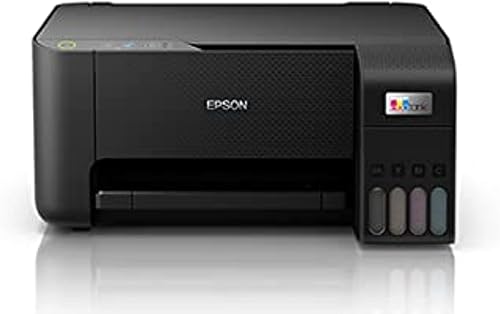
Epson
Epson EcoTank L3210 A4 All-in-One Ink Tank Printer

Epson
Mono Printer WiFi All-in-One Ink Tank + 10 Reams A4 | Epson M3180

HP
HP All-in-One Printer Smart Tank 585 | Wi-Fi Multifunction Inkjet Printe

Takealot