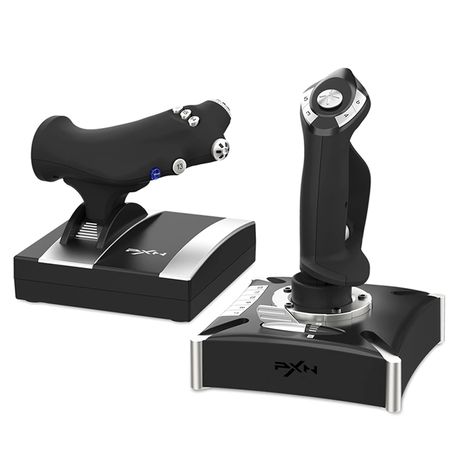
PXN-2119Pro Flight Simulator Controls Vibration Flight for joystick PS4,Pc
Flight Simulator Controls PS4,Pc
R 1 600.00
Takealot · checked Today
2 offers · 2 retailers
Listed under the same model number
No barcode ties these listings together, so no saving is claimed. See the listings
Matched by model number; no shared barcode
- Average
- R 1 558.46
- Lowest seen
- R 1 400.00
- Highest seen
- R 1 999.00
- Last change
- R 133.00
- First indexed
- 25 Apr 2025
- Retailer
- Takealot
Description
- Product Features PXN-2119Pro Game Flight Joystick is composed of "rocker arm unit" and "throttle valve" ,Simulate the throttle rudder, simulate the throttle push rod of the aircraft, can set the throttle reasoning, come with a sense of damping feedback, and freely control the engine engine, Built-in dual vibration motors to simulate the vibration generated by real airflow, allowing you to experience a stronger sense of real game substitution.
- PS4 Compatibility 2119Pro is Compatible only PS4 for "Ace Combat-Unknown Territories" 2119PRO is Compatible only is suitable for "Microsoft Flight Simulator 2020" and "Ace Combat-Unknown Territories" , FOR PC Windos XP 7/8/10 such as for Microsoft Flight Simulator 2020,War Thunder, H.A.W.X.2, World of Warplanes, X-Plane, Air Combat, and more. NOTE:DOES NOT Support Mac Apple Devices / PS3/PS5)
- PC Connection Method Step 1 Launch PXN official website (e-pxn) to download and install driver,details show below:Home--support--tools--find PXN joysitck software to download .step 2 Extract the downloaded driver,and install according to instruction.step 3 plug the PXN Flight joystick into pc usb port,computer will prompt new hardware and install automatically. step 4 then you can play game or conduct joystick settings in PXN Joystick
- PS4 Connection Method PS4 Step 1 Plug the throttle into joystick, then plug the PS4 original controller into guidance port. (Original controller should be powered OFF) Step 2 Plug the joystick into PS4 console USB port.Step 3 PS4 Press No.12 button on joystick launching game to play Press No.13button on joystick launching game to play.
- PRECAUTIONS :After connecting the computer USB, if the computer cannot recognize the PXN-2119 Pro, please download the PXN-2119 Pro driver. If the connection is successful but the buttons do not work, you need to enter the game settings page in the game and select the joystick mode. For the settings of "Microsoft Flight Simulator 2020", you can view the detailed setting steps in E-PXN Official Website - Service - Joystick Game button settings X-Plane 11.
What's in the box
1)PXN-2119Pro Flight Simulator Controls Vibration Flight for joystick PS4,Pc
Similar products

Takealot
Flight Simulator Flight Stick PC Joystick Controller With Vibration PXN GW
5.0(1)R 1 499.00
−20%Takealot
Flight Simulator Stick PC Joystick Flight Stick Controller With Vibration
R 1 600.00R 1 975.06

Takealot
PC Flight Joystick Wired with Vibration Throttle Compatible with Windows
R 1 370.00

Takealot
PXN 2113 PRO USB Flight Simulator Joystick with Vibration for PC
R 1 199.00

Amazon
Thrustmaster T.flight Hotas 5 Microsoft Flight Simulator Edition - Officially-licensed Joystick - Throttle - Simulation Controller for PS5, PS4, PC
4.3(80)R 2 699.00

Takealot
PC Flight Simulator Joystick with Vibration & Throttle Control Wired USB
R 1 299.00

Takealot
Flight Simulator Joystick & Throttle Control Set - Dual Control Flight
R 2 498.00

Takealot
PC Joystick Flight Simulator Controller USB Wired for Windows Flight Games
R 899.00

Takealot
Flight Simulator Stick PC/Joystick Flight/Stick Controller With Vibration
4.0(1)R 2 399.00
Takealot
Flight Stick Joystick For PC / PS4 / Xbox One & Series Realistic Flight PLK
R 2 499.00

PXN
GC Flight Simulator Controls for PS4/Xbox One/PC-PXN 2119-Pro-USB Joystick
5.0(3)R 1 600.00
−22%Takealot
Professional Flight Simulator Joystick Precision Control PC & Console PK
R 1 799.00R 2 299.00