
SATA to USB 3.0 Converter Cable - Hard Drive Adapter
with 3-Minute Auto Sleep, Supports 2.5" SSD & 3.5" HDD, Compatible with Laptop, TV, Router
Takealot · checked Yesterday
25 offers · 2 retailers
Listed under the same model number
No barcode ties these listings together, so no saving is claimed. See the listings
Matched by model number; no shared barcode
- Average
- R 169.00
- Lowest seen
- R 169.00
- Highest seen
- R 169.00
- Last change
- R 0.00
- First indexed
- 15 Sep 2026
- Retailer
- Takealot
- View
R 109.00
- View
R 109.00
- View
R 109.00
- View
R 109.00
- View
R 109.00
- View
R 109.00
- View
R 109.00
- View
R 109.00
- View
R 109.00
- View
R 109.00
- View
R 109.00
- View
R 115.00
+R 6.00
- View
R 115.00
+R 6.00
- View
R 139.00
+R 30.00
Takealot This listing
SATA to USB 3.0 Converter Cable - Hard Drive Adapter
Checked Yesterday
ViewR 169.00
+R 60.00
- View
R 179.00
+R 70.00
- View
R 179.00
+R 70.00
- View
R 179.00
+R 70.00
- View
R 179.00
+R 70.00
- View
R 179.00
+R 70.00
- View
R 179.00
+R 70.00
- View
R 179.00
+R 70.00
- View
R 185.00
+R 76.00
- View
R 185.00
+R 76.00
- View
R 208.00
+R 99.00
Each price is from PriceFind's last check of that retailer. Follow the link for the live price.
Description
Turn that old hard drive sitting in your drawer into a handy external drive with this SATA to USB 3.0 Adapter - no tech skills required.
Plug and play, that simple: No drivers, no complicated setup. Just connect your drive to the adapter, plug it into your computer's USB port, and you're ready to access your files. The LED indicator shows you exactly what's going on - steady lights for power, blinking for data transfer.
Fast transfers, no waiting: With USB 3.0 speeds up to 5Gbps, you can move large files in seconds. Real-world tests show read speeds around 446MB/s and write speeds around 453MB/s - plenty fast for everyday backups, photo transfers, or watching movies straight from your external drive.
Built to protect your drives: This adapter has a smart 3-minute auto-sleep feature. If you're not using it, it powers down to save your hard drive's lifespan. When you need it again, it wakes up automatically the moment you read or write data. No manual switching, no hassle.
One adapter, many devices: Compatible with a wide range of drives:
- 2.5-inch mechanical hard drives (HDD)
- 3.5-inch desktop hard drives (HDD) - requires included power adapter
- Solid State Drives (SSD)
- CD-ROM drives (some desktop models)
Use it with your computer, laptop, smart TV, router, tablet, or HD media player - it's a versatile tool for any home setup.
Use it the right way: For 2.5-inch drives, simply plug in via USB - no extra power needed. For 3.5-inch drives, follow this order: connect hard drive first, then power supply, then USB. When disconnecting, always safely eject from your computer first to keep your data safe.
What's in the box
1 x USB 3.0 to SATA Converter Cable
Similar products

Takealot
Dual USB SATA Cable - SATA to USB Cable - Hard Drive Converter Adapter
4.2(189)
Takealot
Dual USB 3.0 & USB 2.0 SATA Adapter Cable - Black

Amazon
Sata to USB 3.0 Cable, Sata to USB Adapter Compatible for 2.5"" HDD & SSD Hard Drive Reader-External Hard Drive Converter/Hard Drive to USB Adapter., Black
5.0(1)
Takealot
USB 3.0 to SATA Cable - High-Speed Hard Disk & SSD Converter Adapter
5.0(4)
GLINK
GLINK USB 3.0 To SATA Adapter Cable For 2.5 And 3.5 Inch HDD SSD Drives

Gadget Mafia
USB 3.0 to SATA Adapter Cable with Micro USB Power, Hard Drive Converter for 2.5 Inch SSD/HDD, Black
 −1%
−1%Takealot
Dual USB 3.0 to SATA Adapter Cable for 2.5" & 3.5" HDD SSD Drives
4.6(14)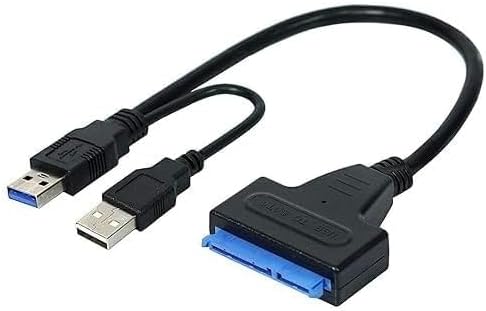
Amazon
USB 3.0 to SATA Adapter Cable for 2.5" HDD/SSD, External Hard Drive Converter, Fast Data Transfer 6Gbps, Plug & Play
4.7(5)
Takealot
USB 2.0 To SATA IDE Adapter Cable
5.0(3)
Takealot
USB 3.0 Adapter Cable for 2.5" SATA SSD/HDD Drive
4.5(217) −21%
−21%Takealot
USB 3.0 to SATA Adapter Cable for 2.5" & 3.5" HDD SSD

Takealot